Datalogger Demo Config - fails to compile "no matching signatures" error in script
Answered
Hi,
this is a strange one, we have 2 identical Dell windows 10 home 64bit laptops in the office, both same age and spec, both running the latest version of powervision: 2.9.21075, one that stays in the office, & one that we use for site visits, normally sits on the network and has a full copy of everything from our google drive synched to it, so should it ever get lost/stolen or damaged on a client site, we dont loose everything and we know it should work ok at its the same kit as in the office.
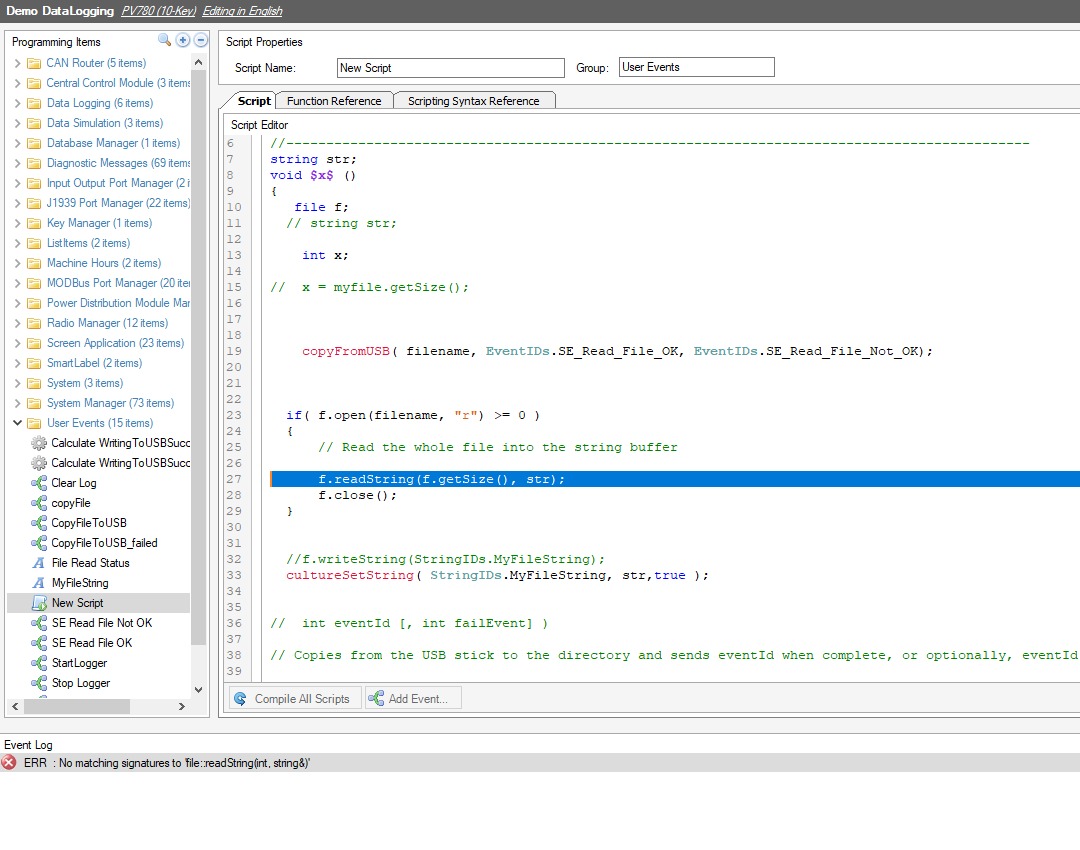
The office machine , imports the demo config for datalogger fine, compiles and loads into a screen no problem. The other machine, throwns up this error that we've not seen before when you try to validate or compile the config in the window at the bottom.
ERR: No Matching signatures to 'file::readString(int, string&)'
if we double click it, it takes to the 'new script' in the config and this line, as shown.
We've tried a full uninstall, reboot and clean install of powervision, to no avail, but the strange thing is it works perfectly on one and not on the other?!?
Any ideas we can try?
 Cheers, Dave.
-
Official comment

Try the readString this way:
string str = f.readString(f.getSize());
Comment actions
Please sign in to leave a comment.
Comments
2 comments