Sender CAN config

Hello Everyone,
Here my query is regarding the Sender CAN. As it has 4 Digital Input & 2 Digital Output & CAN H/L.
As per one of requirement, I need to use Sender CAN as follows:
Input 1 = PORT Clutch Oil Pressure Trip Switch
Input 2 = PORT Gear Engaged Status Switch
Input 3 = STBD Clutch Oil Pressure Trip Switch
Input 4 = STBD Gear Engaged Status Switch
And to get this signal status through CAN into PV displays (PV380/PV450)
Please suggest the configuration step for the same.
-regards
Rahul J. G.
-

Rahul,
The SenderCAN is not something available to customers to configure, this product is intended for large volume use and is programmed in house using C code.
You are probably inquiring about the XM500 which does have the 4 inputs and two outputs you are referencing.
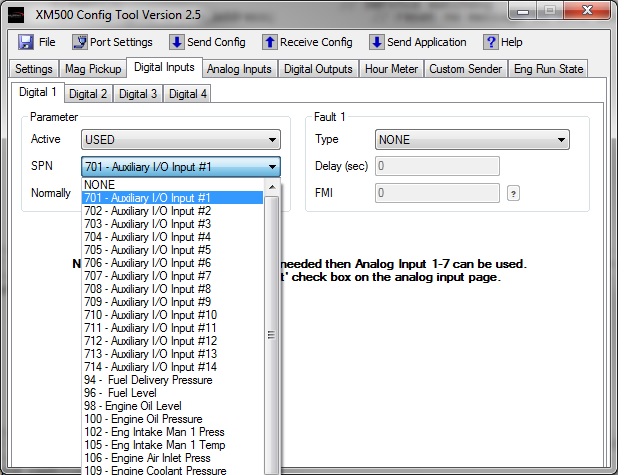
COnfiguration is pretty simple with the config tool P/N 78700534. Select the digital inputs tab then make the necessary drop down box selections. The XM500 is capable of sending a fault message on input activation if necessary. Since the SPN list is somewhat limited in the XM500 I would use the general purpose AUX I/O SPN's. See picture below.
Instructions are available on our web site.
Regards,
Eric
-
Hello Eric,
Thanks for reply.
I agree to this, actually the need is something different.
There is Panel build with the PV380 display and further it comes to add this Inputs, so after I checked for compact way of expansion, so I found this SenderCAN as one of product.
That’s why it was planned for SenderCAN, now as I am looking for config and further testing/completion, I found this Query of SenderCAN, for assigning inputs (that how to make it).
For a while agree to all and taking an assumption as:
Now there is addition of these few Inputs and all Input of XM500 is used. So Plan is for using SenderCAN, and will it be possible for getting as configured SenderCAN (as per required), or there might be other product/solution way.
4-inputs of SenderCAN assign to == SPN 701, 702, 703, 704.
Please suggest the suitable solving method.
-regards
Rahul
Please sign in to leave a comment.
Comments
2 comments